Purchase
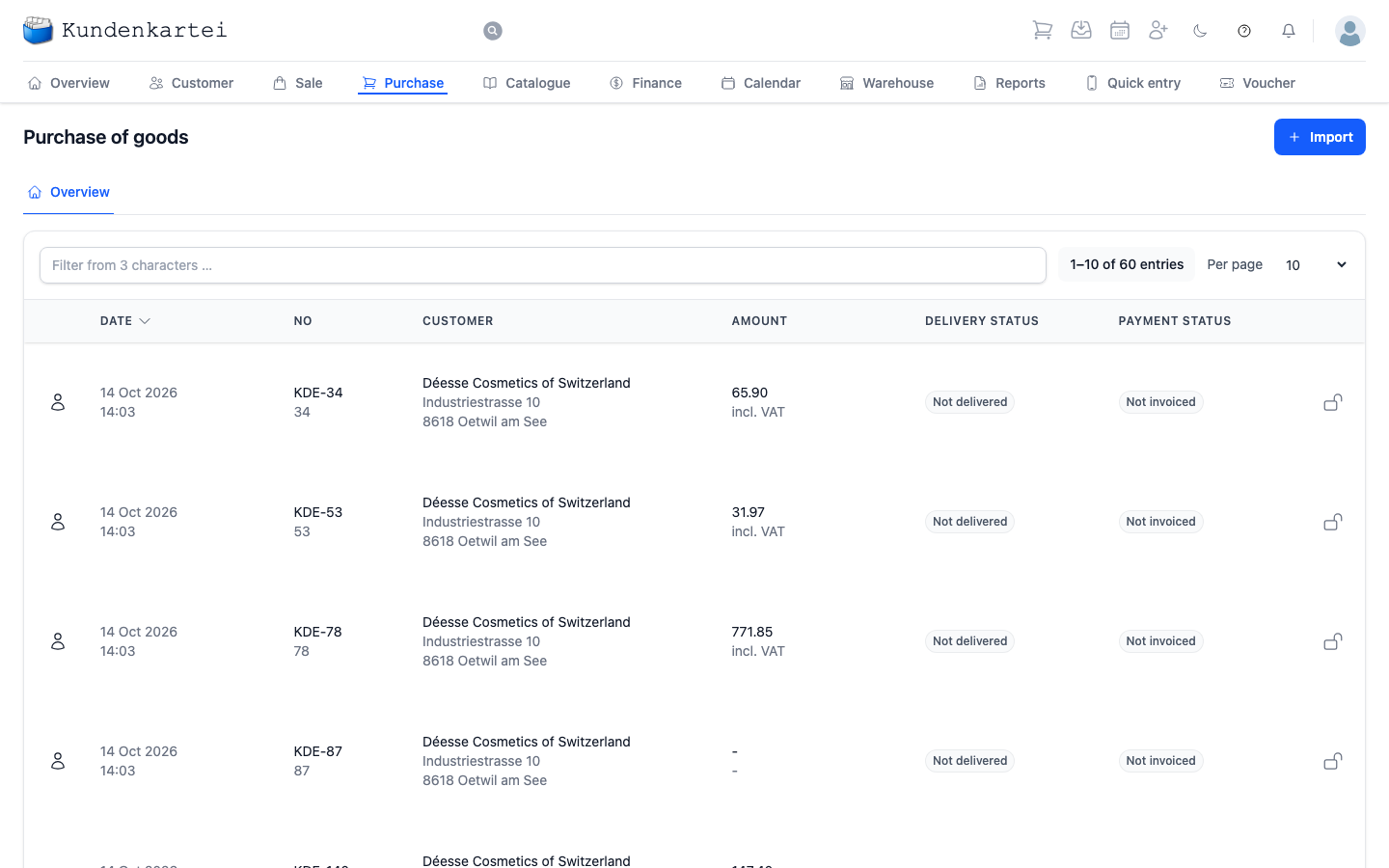
Purchase holds what you have ordered from your suppliers — and the state each of those orders is in. In the application the page is headed “Purchase of goods”.
It is a list, nothing more. Ordering, receiving and paying happen elsewhere; here you see where something is stuck.
The list
A search field sits at the top. It takes effect from three characters — before that nothing happens. It searches the whole row, so the order number works just as well as the supplier.
Beside it you are told how many entries exist in total and which of them you are seeing. Per page changes how many rows appear at once.
The list is sorted by date, the most recently changed order first. A click on a column title re-sorts it.
What a row tells you
At the far left of every row is a person symbol. It is the same for every order and distinguishes nothing.
| Column | Content |
|---|---|
| Date | when the order was last changed, with the time |
| No | the order number, with the supplier's number below it if one has been recorded |
| Customer | the supplier you ordered from, with the address |
| Amount | the total, with “incl. VAT” or “excl. VAT” below it |
| Delivery status | whether the goods have arrived |
| Payment status | whether the invoice has been recorded and paid |
The two status columns are the heart of the page. They answer two questions that have nothing to do with one another: are the goods here? and has the invoice been paid? An order can be delivered and still uninvoiced — and the other way round.
| Delivery status | Payment status | Colour |
|---|---|---|
| Not delivered | Not invoiced | grey — open |
| Partial deliveries | Invoiced, Partially paid | yellow — under way |
| Supplied | Paid | green — done |
“Invoiced” means the invoice has been recorded but not yet paid.
Clicking a row opens the order.
A dash in the amount means no amount has been recorded yet.
Where to begin
- What has not arrived? Look for “Not delivered” — those are the orders you are waiting on
- What has not been invoiced? The Payment status column, “Not invoiced”. No invoice has been recorded for these orders yet
- Looking for a particular order? Number or supplier into the search field, from three characters
Next
- Purchasing — the whole path from requirement to paid invoice, including importing a Déesse invoice
- Warehouse — what the delivery does to your stock
- Finance — where the supplier invoice ends up